टाइपिङ टिप्स, कसरी ठान्ने र किबोर्डमास्टर बनाउने

1) शुद्धता

मैले महिनासम्म मेरो गति बढाउने कोशिश गरें र म म देखिएन केहि सुधार भएको। एकपटक थाहा पारें र म बढी शुद्ध बनें। म तेजीले टाईप गर्ने कोशिश गरेंँ भने मेरो टाईपिङ गति म बढी देखें। म स्वयंमाथि पुर्ण नियन्त्रणमा महसुस गर्छु। मेरो व्यक्तिगत लक्ष्यमा गइरहेको छ तर म मुटु मा छुनुभएकोले खुसी छ कि म अहिले सुधार गरें र अधिक आराम गरें।
पहिलो शुद्धता सिक्नुहोस तपाईंको गति बढाउनुहोस् भनेको हो। किनभने तपाईं नियमित गरें भने तपाईंले टाइप गरेको कुनै पनि गल्तीले समय बढ्नेछ। तपाईंले जति पनि पछाडि जानु भयो त्यति बढी समय लाग्छ। हरेक पटक तपाईंले गलत टाइप गर्नु भने त्यसले तपाईंले तपाईंको गति बढाउनु भन्दा पनि ठूलो समय लिन्छ। खासै छैन भने तपाईंले सानै बढी गति गर्नका लागि थोडो बाध्य गर्नुहोस् भने तपाईंले अझै थाहा पाउँछ।

2) अभ्यास

नयाँ टाइपिस्टहरूको लागि: अभ्यास गर्नुहोस्। होम कि पुराना कुनै टाइप गर्नुहोस् कि तपाईंले टाइप गर्दैनौं भने तपाईंको उंगलीहरू दुवै को हेर्न कि किबोर्डमा।

उनै टाइपिस्टहरूको लागि: अभ्यास गर्नुहोस्। टाइप गर्दा मास्कुल मेमोरी बनाउनुहोस् कि कसै पनि किनैपनि हेर्न आवश्यक छैन भने वा तपाईंले सोच्न नपर्नुहोस्।
मेरो टाइप गर्ने गति बढाउनको लागि मैले यो सुझाव दिएछु कि मात्र अक्सर अभ्यास गर्नुहोस्, बरु सहि गर्नुहोस्। केहि देखाउने बुरा टाइपिङ आदतहरूलाई छोड्नुहोस् र राम्रोहरूले उनीहरूलाई स्थानान्तर गर्नुहोस्। उदाहरणका लागि, जब तपाईं टाइप गर्दै हुनुहुन्छ, तपाईंले केवल आफ्नो आमा वा तपाईंले सबैभन्दा बढी अहम हुनुहुन्छ उब्जैज गर्नुहोस्। तपाईंले सकिनुहुन्छ कि सी भनेको भने मध्य उंगली तल हेर्न र सी ठूलो समय साथै टाइप गर्नुहोस्। हरेक पटक तपाईं गलत टाइप गर्नुहुन्छ भने म समझदैछु कि म शुद्ध गर्नको लागि जब म थोडो बढी धेरै टाइप गर्दछु भने म वास्तवमा थोडो ठूलो समयमा टाइप गर्दछु।

3) स्ट्रेचिङ

जब मेरो कलाइहरू टाइपिङ गर्दा ठिक भएको छ, म मेरो एक हातले मेरो उंगलीहरूलाई पक्रेर मेरो बाउँ को पुराइछु र धेरै समय समयमा मेरो उंगलीहरूलाई पछि तानेर आफ्नो हातलाई फर्केर गर्छु। म पछि, तानेर मेरो उंगलीहरूलाई खोलेर र सुन्ने छालाहरूलाई चिरेर मेरो हातलाई पछि फर्काउँछु र आफ्नो कलाइहरूलाई घुमाउँछु।
तपाईंले अब वा क्नक्न भएकोमा थोडो सोजो पनि भएकोमा यदि तपाईंको उंगलीहरू थोडो बाँकी छ भने, आफ्नो हातहरूले उच्च मा राख्नुहोस् र आफ्नो उंगलीहरू (तपाईंको उंगलीहरू दुख्छ भने मात्र यसलाई गर्नुहोस्। ) र तपाईंको तर्जुमा गरेको हो भने, तपाईंको बायाँ हातलाई एक पुर्टीमा राख्नुहोस् र दायाँ साथले अनुसरी गर्नुहोस्। तपाईंको बायाँ कुरा को पुर्टीबाट, तपाईंको दायाँ हातमा उंगलीहरूमा ट्याप गर्नुहोस् र उम्मी विसर्जन।

4) तपाईंको किबोर्डमाथि पर्चा

मेरो टाइपिङ गति बढाउनका लागि मौ सुझाव छ कि "F" र "J" मा महसूस गर्नुहोस्। बहुत जना थाहा छन्, यी त तपाईंले किबोर्डमा पहिलो पटक महसूस गर्नुपर्छ भने छैन। समय बितेमा, र तपाईंले हेर्दा टाइप गर्न सिकेपछि, तपाईंले वास्तवमा "F" र "J" महसूस गर्नुहुँदैन। तपाईंले केवल किबोर्ड सिक्नुपर्छ।
यस धारणामा राख्नुहोस् कि तपाईंले कुन किबोर्ड प्रयोग गर्दैछिनुहोस् भने यो महत्त्वपूर्ण छ। - यसले अरू विचारलाई देख्न नपर्न गरेमा तपाईंले स्क्रिनबाट दूर हेर्न आवश्यक छैन भने तपाईंको मनमा किनै कुनै कुनै चिन्हहरूलाई खोज्न नपर्नेछ। यो तपाईंको सोचहरूलाई हराउँदा गरेमा समय कमी हुनेछ (फेरि)।
तपाईंले यदि 60 wpm वा त्यस भन्दा बढी टाइप गरिरहेका छन् र राम्रो बन्न चाहनुहुन्छ, र कार्पल टनल पाइडैनन: एक मेकानिकल किबोर्ड किन्नुहोस्। म रेड स्विच प्रयोग गर्छु जुन म खेल्न/टाइप गर्नका लागि किनेंछु, र एक घण्टा टाइप गरेपछि, मेरा हातहरू अझै पनि राम्रो महसूस गरिन्छ। म धेरै टाइपिङ गर्ने लागि रेडलाई सिफारिस गर्दैनँ--यसलाई अन्य स्विच प्रकारहरूको प्रतिक्रिया हुँदैन, र टाइममा तलक गइरहेको छ भने संयास गर्न गरेको छ।

5) रिदम

महत्त्वपूर्ण कुरा हो गति बढाउँदै, भाग्यको लागि होइन, तर शुद्धता, पहिलोको प्राथमिकता हो। गति प्राकृतिकतासँग आउँछ अभ्यास र समयसँग। थप, व्यक्ति लाइ सुधार गर्न लागि आत्मसमर्पण गर्नुपर्छ, तर यो अभिवृद्धि गर्ने मात्र हो, कि कुशलता केवल स्थापित हुन्छ, यसले गरेमा, सङ्ग सङ्ग। समापनमा, व्यक्ति ले मात्र टाइप गर्छ कि जुन उहाँले हेरेको वा पढेको हुँदैन; कुनै शब्दहरूलाई परिवर्तन गराउँछैन, अनुसन्धान, यसले गरेमा... अभ्यास/परीक्षा। व्यक्ति ले केवल उनीहरूले हेरेको वा पढेको कुरा मात्र लेख्नुपर्छ!

प्रशिक्षण शुरू गर्नुहोस्

स्पर्श टाइपिङ

टच टाइपिङ भनेको किबोर्ड हेरेर हेर्दैनु टाइप गर्नु हो। यसको उद्देश्य तपाईंको औंलाहरूलाई प्रत्येक कुञ्जको स्थान सिकाउनु हो। F र J कुञ्जहरूमा एक उच्च बार वा बिन्दु छ जुन तपाईंको औंलाले पहिचान गर्न अनुमति दिन्छ। एक पटक तपाईंले तीनौं कुञ्जहरू उनीहरूमा राखेपछि, अन्य औंलाहरू तिनीहरूको पासको कुञ्जहरूमा राखिन्छ।

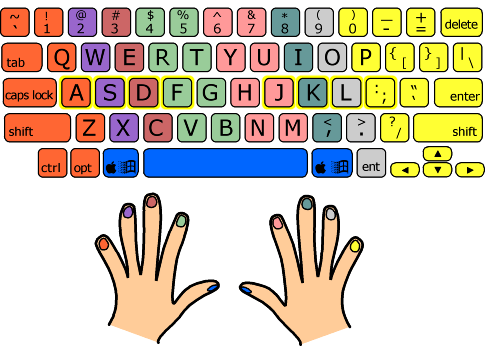
गति सानो गर्नका लागि तपाईंले जुन औंला प्रयोग गर्नुपर्छ भने तपाईंले सावधानीपूर्वक हेर्नुपर्छ कुन औंला प्रयोग गर्नका लागि। तलका चित्रहरू हेर्नुहोस्। प्रत्येक रंगले एक औंला समान्छ। उदाहरणका लागि बायाँ इन्डेक्स हरियो रंगको छ र केवल हरियो रंगका कुञ्जहरूलाई मात्र टाइप गर्नुपर्छ।
typing test tips

केहि कुञ्जहरू विशेष छन्। ASDF र JKL; मौजस्तो ठाउँहरू तपाईंको औंलाहरूको लागि हुन्छ। तपाईंको औंलाहरू आधार स्थितिबाट कुञ्जको प्रतिस्थानमा जान्छ।

जब तपाईंले टच टाइपिङ सिक्न थाल्नु हुन्छ तब किबोर्ड याद गर्नुहोस् र सम्बन्धित औंलाहरूको मानसिक नक्सा बनाउनु हो। तपाईंले कुनै पनि कुञ्जलाई सोचिनुपर्छ भने मैले C भनें तपाईंले माध्यमिक औंलालाई तल ल्याउनुपर्छ र C मा दबाउनुपर्छ। यो गर्न तपाईंले केवल अभ्यास गरेर हुन्छ। तपाईंले प्रत्येक औंलाको मस्तिष्क स्मृति बनाउनुपर्छ।

मुख्य विचारहरू

* तपाईंको इन्डेक्सहरूलाई F र J मा राख्नुहोस्
* प्रत्येक पुग पुगमा एकै औंलाद्वारा थिचिनुपर्छ
* किबोर्ड हेर्न नपर्नुहोस्, तपाईंका आँखाहरू सधैं स्क्रिनमा हेर्नुपर्छ
* जानु अभ्यास गर्नुहोस्!

टाइपिङ टेस्ट लिनुहोस्

प्रयोगकर्ता सुझावहरू


shmogglebeans 4 वर्षहरु,4 महिनाहरु अगाडि
When I was a child, my dad was a chicken pecker when it came to typing. He always wanted to be faster with computers, and had he lived to see the modern age of technology, I believe he would have loved this website. He bought me Mavis Beacon and All The Right Type to practice at home, and I frequently found him taking breaks from work to plod his way through typing tests, staring ardently at his hands to make sure they stayed on the home row. Now, at my best, I can type over 100 WPM, and I owe that dedication and determination to him.

जवाफ दिनुहोस्
fartchili 4 वर्षहरु,4 महिनाहरु अगाडि
I set myself a goal speed, like 90WPM, and whenever I don't meet that speed on a test, I click on the title and train on the quote until I either reach that speed or do the test five times. That way my fingers get accustomed to whatever made me mess up more or get slower on the quote. It's way better than just dreading any time a quote comes up with keys I'm not good at. Practicing the same quote over and over also helps my fingers "memorize" certain combinations of keys so they can perform them without me having to think about it. The more combinations my fingers know, the faster I can type.
I also make sure that I'm using the right fingers on the right keys. The more you practice pressing a key with the wrong finger, the stronger the bad habit becomes. I intentionally slow down and make sure I'm typing the right way every once in a while.

जवाफ दिनुहोस्
peter00151 4 वर्षहरु,4 महिनाहरु अगाडि
While typing on a desktop keyboard, always remove left control key cap when you want to type a little faster to prevent unintentional tab shutdown ctrl+w. It makes you feel great knowing this silly painstaking accident would not happen that much anymore. And of course if you will, remember to put that cap back in place.

जवाफ दिनुहोस्
mach3 4 वर्षहरु,4 महिनाहरु अगाडि
A good strategy seems to be 1st to focus on accuracy, and 2nd to focus on a consistent typing pace, NOT speed. Once the time between hitting each letter is balanced, speeding up simply becomes a matter of repetition.

जवाफ दिनुहोस्
u_name 4 वर्षहरु,4 महिनाहरु अगाडि
What really helped me improve my typing speed is typing without looking at the keyboard (Although that can take time for beginners to achieve)

जवाफ दिनुहोस्
user95418 4 वर्षहरु,4 महिनाहरु अगाडि
When my fingers hurt after too much time on the keyboard, I...Stop writing and take a small rest. Then start writing again. (Thank you).

जवाफ दिनुहोस्
gabetax 4 वर्षहरु,5 महिनाहरु अगाडि
@emeraldsloth I started logging this about one or two months after migrating to Colemak from QWERTY. On QWERTY I was generally 120-140wpm, so I think I'm primarily restoring the speed I already had. I think a lot of speed comes down to memorizing individual words; the first time I type an uncommon word my speed dramatically drops, and when I practice common vs rare words (Monkeytype has this feature), the common words are much faster. My advice would fall under:

1. Go slow enough to focus on accuracy. A handful of errors drops my WPM for a test by 10-30.
2. Use peripheral vision to look a little ahead of what you're typing. The little bit of extra time lets your brain plan and queue up the physical motion your fingers will make.
3. Breathe.
4. Practice, often, and diversify how you practice. Transcribing visually only gets you so far. Practice taking dictation (possibly from TV)

जवाफ दिनुहोस्
nickbiiybwalley 4 वर्षहरु,5 महिनाहरु अगाडि
What really helped me improve my typing speed is...
(i) Learning Touch Typing
(ii) Focusing on Accuracy and not speed as you type
(iii) Practicing each and every day

जवाफ दिनुहोस्
waqasahmad 4 वर्षहरु,5 महिनाहरु अगाडि
My tip to improve your typing speed is to..."Just concentrate on accuracy of typing but not speed, speed will automatically establish".

जवाफ दिनुहोस्
kelvinpaul 4 वर्षहरु,5 महिनाहरु अगाडि
Just concentrate accuracy, finally your hand automatically speed up your typing. You don't need to forcefully increase your typing speed.

जवाफ दिनुहोस्
justinebarza 4 वर्षहरु,5 महिनाहरु अगाडि
My tip to improve your typing speed is to... go slow. Start little by little, you don't need to type fast when you are still on the process of practicing. You'll get fast along the way and you won't even notice it. Accuracy is more important than speed when it comes to typing. When you get high accuracy, your speed will follow up eventually.

जवाफ दिनुहोस्
ilyas_mohdd 4 वर्षहरु,6 महिनाहरु अगाडि
My tip to improve your typing speed is to type slowly and accurately, just focus on accuracy and your typing speed will become faster than before. If you try to type faster and make mistakes than your time will go to correct mistakes and it will decrease your typing speed and accuracy, so type slowly and accurately. Just remember one thing typing speed will increase only with practicing typing accurately.

जवाफ दिनुहोस्
v3suvius 4 वर्षहरु,6 महिनाहरु अगाडि
My tip to improve your typing speed is to concentrate on accuracy over speed. There is a time between when you have learned to touch type but are not yet that fast when you plateau for a while. Usually the solution to this is to focus on accuracy over speed, many people push to be faster instead sacrificing accuracy that inevitably leads to a brick wall in terms of progress.

जवाफ दिनुहोस्
zhang 4 वर्षहरु,6 महिनाहरु अगाडि
yoo. who the hell deleted my 165 WPM record and my last few games? my typing average was literally a 151 and now it’s 144. screw you

जवाफ दिनुहोस्
user68783 4 वर्षहरु,6 महिनाहरु अगाडि
The most important thing about typing is practicing consistently, getting a good feeling for the keyboard you are using. Sit properly, and sit the same way that you do when you type all the time. You should focus on certain words that trip you up, slow down when you are practicing, and slowly speed up as you get better at typing certain words, and certain phrases. I think it's most important however is to try to enjoy typing, when you enjoy something you do it more and more, and you gradually will improve at a faster rate. Have fun and good luck! I'm currently at an average of 120wpm and I hope to improve even further, I know you can do it too!

जवाफ दिनुहोस्
user958697 4 वर्षहरु,6 महिनाहरु अगाडि
I became "tired" after typing only a few quotes. Then, I carefully examined: exactly which part of me is "tired"? And I found that it is not the eyes (the receiving device), nor the fingers (the transmitting device) but the brain (the processing device). It's all in the head. Not enough blood is pumping into the head. They say that in order to achieve anything, you must first "imagine (visualize)" it in your head vividly how the "achieved state" is like. Well, that principle is not only applicable to "hopes and dreams" on the scale of a lifetime, but also on a word-by-word basis. At the "tired" state, my head is no longer clearly imagining how a word is typed, but it has delegated the task entirely to the eyes and fingers, which seek to resort to "luck" and attempt to accomplish the task (the typing of a word) through tries and errors. So once again, in short, "it's all in the head".

जवाफ दिनुहोस्